A poster on Notary Cafe accepted a $45 HELOC signing expecting 20 to 40 pages. The package arrived at 105 pages (Notary Cafe, Dec 2025). Offers for a few dollars less than you hoped come fast, and in another thread a Florida poster said that by the time you counter, “it’s gone within 2 minutes” (Notary Cafe, May 2026). So the work has to happen before the offer arrives: decide what a signing costs you, and what your floor is. The steps below do that.
Short version
A $75 offer is worth taking only if it covers what that job costs you. Before you accept, get the page count and the miles, then subtract your mileage, printing and other costs from the offer and divide what’s left by the hours you’ll spend. The IRS standard business mileage rate is 76 cents a mile for July 1 – December 31, 2026, which is a published number you can use for the drive. Official fee caps in Texas and Florida apply to the notarial act, so they don’t tell you whether $75 is a fair price for a whole signing. We don’t publish a “typical fee,” because no official source lists one.
Disclosure: There are no affiliate links in this guide yet. If we add any later, we’ll say so right here. We aren’t paid to rank anything, and nothing here guarantees signing work or income. Our disclosure policy
Key facts
- Mileage rate: 76 cents a mile (business use), July 1 – December 31, 2026. It was 72.5 cents January 1 – June 30, 2026 (IRS).
- State fee caps: Florida: $10 per notarial act, with exceptions for online notarizations and marriages (§117.05(2)(a)). Texas: the Secretary of State says Gov’t Code §406.024 sets the maximum fee for an official act.
- Signing-agent pay: not set by any state. Texas says it “does not commission or register signing agents.”
- What to ask first: page count, loan type, number of signers, miles, and whether a witness is needed.
Step 1: Ask for the page count and the package type
The offer text you get from a signing service often leaves out the page count. In the same Notary Cafe thread, posters say the service may not know it yet because the documents aren’t ready when the offer goes out. Ask anyway, and ask for these five things:
- Loan type (purchase, refinance, HELOC, seller documents).
- Estimated page count, and whether you print one set or two.
- Number of signers, and whether a witness is needed.
- Address, so you can check the miles.
- Whether the fee can change if the package turns out larger than estimated.
Some posters in that thread and a 2026 thread on a 200-page refinance say they put a page limit in their reply: the fee applies up to a set page count, with a print fee above it. That’s their practice, not a rule. If you adopt it, put it in writing before you accept (Notary Cafe, Sep 2026).
Step 2: Put a number on the drive
The IRS publishes a standard mileage rate each year, and in 2026 it changed on July 1. Its page lists 76 cents a mile for business use from July 1 to December 31, 2026, and 72.5 cents for January 1 to June 30 (IRS, standard mileage rates). The IRS sets the rate for a tax deduction. We use it here only as a dated, published yardstick for what a mile of driving costs, and we can’t tell you how it applies to your taxes. Ask a tax professional about that. Your real cost per mile may be higher or lower.
Count round trip. A 15-mile drive each way is 30 miles: 30 × $0.76 = $22.80. The rate changes, so look at the IRS page for the date of your signing.
Step 3: Put a number on printing, supplies and extras
Use your own figures, because they depend on your printer, paper and toner. For each signing, write down:
- Pages you’ll print × your cost per page. Double it if the package needs two sets.
- Shipping or drop-off cost, if the signing service doesn’t pay for it.
- Anything else the job needs (a second trip, a witness you pay, parking).
For ideas on what a setup costs, see our loan signing agent supplies list. It has no per-page prices because those depend on your equipment.
Step 4: Count your time, then divide
Count the whole job, not only the minutes at the table: reading the package, printing, driving there and back, the signing itself, and scanning or shipping afterward. Then:
(Offer − mileage − printing − other costs) ÷ total hours = what you earn per hour on this job.
That figure is before your own taxes, insurance and supplies, so it’s not a take-home number. Compare it with the floor you’ve set for yourself. If you haven’t set one, that’s the decision to make first.
A worked example (made-up inputs)
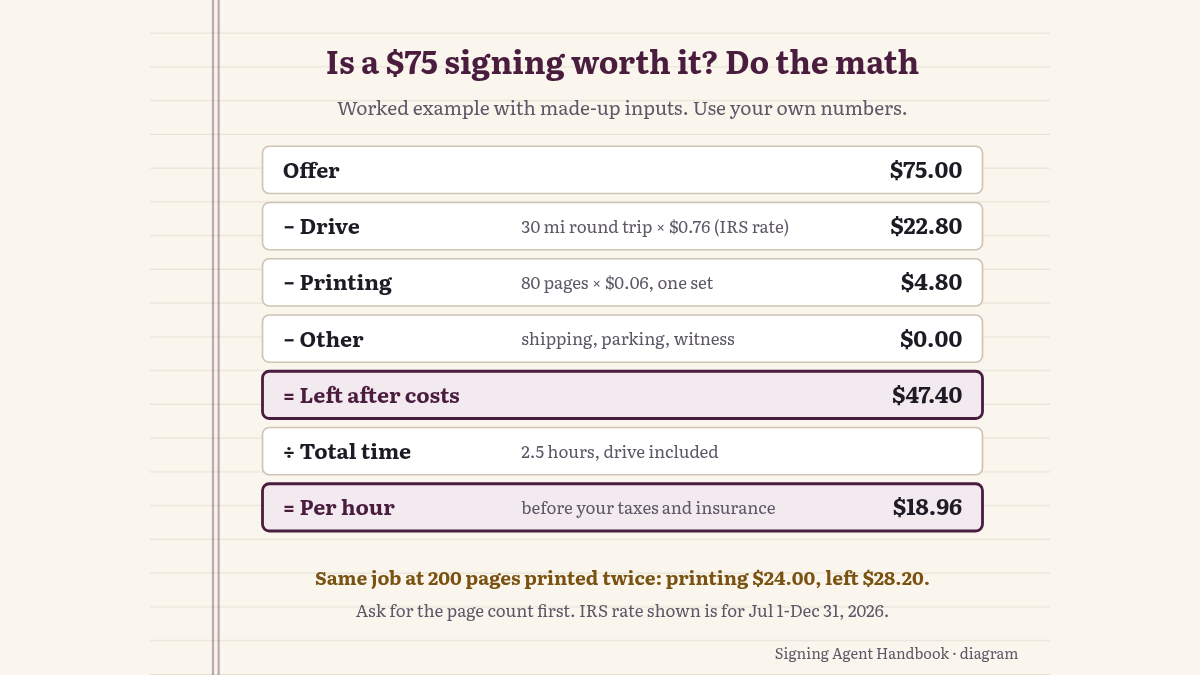
These numbers are invented to show the arithmetic. Replace each one with your own.
| Line | Example | Your number |
|---|---|---|
| Offer | $75.00 | |
| Round trip | 30 miles × $0.76 = $22.80 | |
| Printing (assumed $0.06 a page, 80 pages, one set) | $4.80 | |
| Other costs | $0 | |
| Left after costs | $47.40 | |
| Total time (assumed 2.5 hours, drive included) | 2.5 hours | |
| Per hour, before your taxes and insurance | $18.96 |
With the same inputs but 200 pages printed twice, the printing line is 400 pages × $0.06 = $24.00, and the “left after costs” line drops to $28.20. That’s why page count is the first question. An offer that clears your floor at 80 pages may not clear it at 200.
What do Texas and Florida fee caps cover?
They cover the notarial act: the notary’s fee for an acknowledgment, jurat or similar act. They don’t set what a signing service pays for the whole appointment.
- Florida: “The fee of a notary public may not exceed $10 for any one notarial act under this part, except as provided in s. 117.045 or s. 117.275” (Fla. Stat. §117.05(2)(a)).
- Texas: the Secretary of State’s FAQ says “Texas Government Code §406.024 specifies the maximum fees for an official act performed by a notary public. A lesser fee is allowed or no fee at all may be charged” (Texas SOS Notary FAQ).
- Signing-agent pay: the Texas SOS FAQ says: “The Office does not commission or register signing agents. Accordingly, the Office does not have any information on this profession.”
We didn’t find an official page in either state that explains how the notarial-fee cap applies when a signing service offers you one fee for the whole appointment. If you need that answered for your situation, ask the Texas Secretary of State, the Florida Department of State, or an attorney. We can’t give legal advice.
When you get an offer you don’t want to accept as-is
You have three options, and none of them requires a speech:
- Accept. The numbers clear your floor.
- Counter in writing. State your fee and what’s behind it, such as page count or distance. Say what your fee is for this package, and that you’ll need an adjustment before the appointment if the package is larger than estimated. Keep it short and keep a copy.
- Decline. Decide ahead of time that some offers aren’t worth the drive. Posters in the threads above describe offers that disappear in minutes, and that countering sometimes works and sometimes doesn’t. We can’t tell you which you’ll get.
Common slip-ups
- Accepting before you have the page count. A package can be several times the size you assumed.
- Counting only the minutes at the table. The drive, printing and scanning are part of the job.
- Using last year’s mileage rate. The IRS changed it in July 2026.
- Treating the state fee cap as the going rate. It covers the notarial act, not the appointment.
- Agreeing to a change by phone. Get any fee adjustment in writing before you go.
Questions about the math
Is $75 a good fee for a loan signing?
There’s no official figure. It depends on the page count, the miles and your time. Work out your cost with the steps above and compare it with your own floor.
What is the IRS mileage rate for 2026?
76 cents a mile for business use from July 1 to December 31, 2026, and 72.5 cents from January 1 to June 30, 2026, according to the IRS.
Is the maximum notary fee in Texas or Florida the signing fee?
No. Those caps are for notarial acts. Texas says the Secretary of State “does not commission or register signing agents.”
Can I ask the signing service for more money after I see the package?
You can ask. In the Notary Cafe threads, posters say it sometimes works and sometimes doesn’t, and some say to agree to the adjustment in writing before accepting.
Where to go from here: New to the business? Start with how to become a loan signing agent. Want to know what a first setup includes? See the supplies list.
Where the numbers come from
The numbers come from the IRS standard mileage rates page, the Texas Secretary of State’s notary FAQ, Florida Statutes §117.05, and three Notary Cafe threads, all checked October 30, 2026. We quote forum posts briefly and don’t name posters. The worked example uses invented numbers to show the arithmetic. We aren’t attorneys, accountants or tax advisers, and this isn’t legal or tax advice. Spotted a problem? Contact us.
Sources
- IRS, Standard mileage rates (page last reviewed July 28, 2026): https://www.irs.gov/tax-professionals/standard-mileage-rates
- Florida Statutes ch. 117 (2026), incl. §117.05(2)(a), notary fee: https://www.flsenate.gov/Laws/Statutes/2026/Chapter117/All
- Texas Secretary of State, Notary Public FAQs: https://www.sos.state.tx.us/statdoc/faqs2300.shtml
- Notary Cafe, “Is there any way to know the page count before accepting a signing?” (Dec 2025): https://forum.notarycafe.com/t/is-there-any-way-to-know-the-page-count-before-accepting-a-signing/54795
- Notary Cafe, “Low Fees new normal” (May 2026): https://forum.notarycafe.com/t/low-fees-new-normal/56229
- Notary Cafe, “Large Print package” (Sep 2026): https://forum.notarycafe.com/t/large-print-package/58271
General information, not legal or tax advice.