A Notary Cafe poster shared an email that looked like it came from a known signing service. The poster called it “Definitely Phishing” and said a free link-scanning site flagged both links in it (Notary Cafe, Aug 2026). Another poster in that thread said the fake looked just like a real company’s email “except for the return address.” So a clean layout doesn’t tell you much. The steps below do.
If you only read one thing
The National Notary Association’s July 2026 warning names two scams that target notaries directly. The first is a fake signing assignment: a “client” sends a check or payment for more than your fee and asks you to refund or wire back the difference, and the original payment later bounces. The second is wire fraud at a real closing, where someone emails altered wiring instructions. One check stops most of them: verify through a phone number or website you already have, never the one in the message. Never send money back from a payment that hasn’t fully cleared.
Disclosure: There are no affiliate links in this guide yet. If we add any later, we’ll say so right here. We aren’t paid to rank anything, and nothing here guarantees signing work or income. Our disclosure policy
Key facts
- Fake assignment: an overpayment, then a request to refund or wire the difference. “No legitimate client overpays and asks for change” (NNA).
- Phishing pattern: a vague inquiry, then a push to move to a video call or open a link.
- Payment stop signs: wires, gift cards, cryptocurrency, “refund the overpayment.”
- Your best check: call or type the address yourself, from a source you already trust.
- If you’ve lost money: tell your bank right away. The FBI takes fraud complaints at ic3.gov (its June 2026 alert on a related fraud points victims there).
Why are notaries a target?
Notaries are tempting targets for three reasons, according to the NNA: a notary’s name, phone number and email are often public so clients can find them; notaries often work with companies and signers they haven’t met; and they “regularly participate in high-value transactions where a single successful fraud scheme can mean a payoff of six figures or more for scammers” (NNA Bulletin, July 1, 2026).
The California League of Independent Notaries (CLIN) adds that scammers appear to be “harvesting contact information directly from public notary directories, websites, and online profiles” (CLIN, May 16, 2026). CLIN describes this as what “industry discussions suggest,” not a measured finding. Still, it’s a reason to expect cold messages once your name is listed.
What do the common scams look like?
| What arrives | What it looks like | How to check |
|---|---|---|
| Fake signing assignment (NNA) | Offers you notarization or signing work, then sends a check or payment for more than your fee and asks you to refund or wire back the difference. The original payment later bounces. | Don’t refund or wire anything. Ask for the exact fee. Wait until the payment has fully cleared before you spend or return any of it. |
| Vague inquiry, then a link (CLIN) | A generic request to notarize “tax documents” or other paperwork, with few details about the sender, the signer or the transaction, then a quick push to move to Zoom and a link meant to harvest passwords or install malware. | Don’t click. Ask for the signer’s name and the document type in writing. Look up the company yourself. |
| Real-looking signing service email (Notary Cafe, Aug 2026) | Looks like it comes from a known service. The return address or links are the tell. | Don’t open the link. Log in to the service’s own portal by typing the address yourself. |
| Callback phishing (NNA) | A fake billing alert claims you were charged for something and lists a phone number to “dispute” the charge instead of a link. | Don’t call the number in the message. Check the charge in your own account or call the number on your statement. |
| Closing wire fraud (NNA) | At a real signing, someone emails altered wiring instructions, posing as the title company or buyer. | Verify wiring instructions by phone, using a number you already have on file, never one from the email. |
| Fake text (NNA) | Unpaid toll alerts for a tiny amount, or a delivery problem that claims to be from USPS, FedEx or UPS, with a link. | Don’t reply, not even “STOP.” Delete, block, and forward the text to 7726 (SPAM). |
| “Your license is expiring” call (FBI, Sep 2026) | A caller, text or email posing as a government office or law enforcement says a “professional license is expiring and demands payment for renewal.” The FBI says scammers spoof real agency numbers and even pose as IC3 (FBI IC3, Sep 17, 2026). | Hang up. The FBI says officials “will never contact members of the public by telephone or text message to demand any form of payment.” Check your commission status with your state’s notary office, using a number or website you find yourself. |
Step by step: what to do when a request arrives
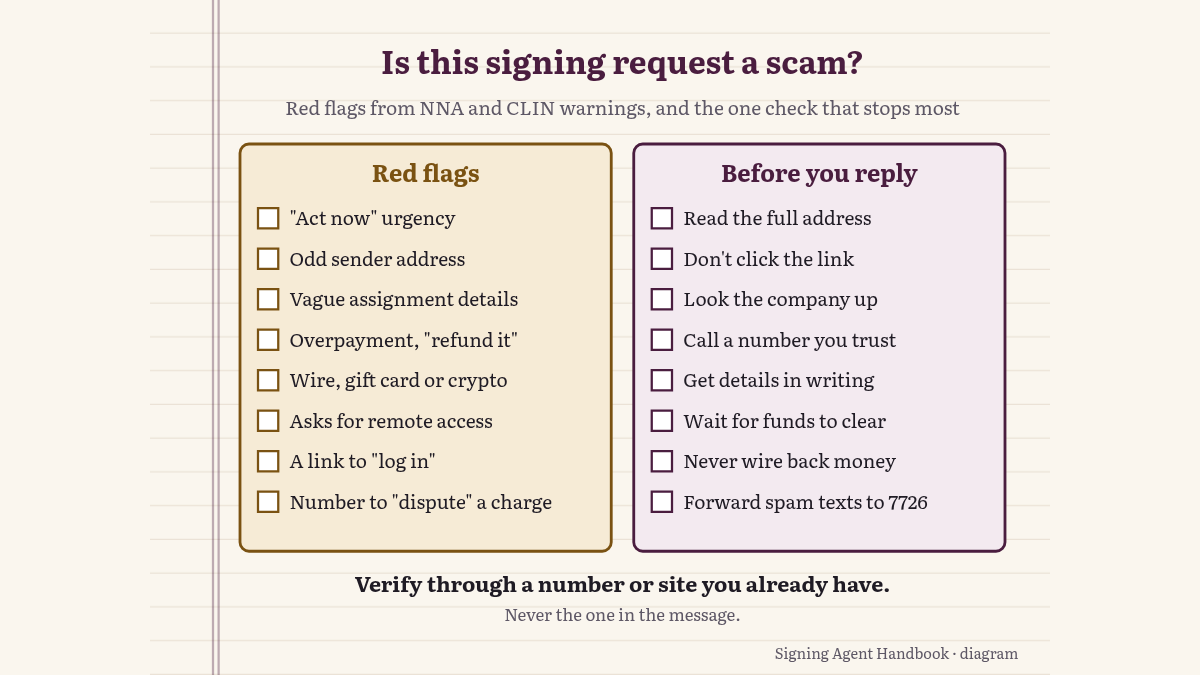
- Slow down. The NNA says the formula is always the same: “a message comes from a trusted-looking source, coupled with a sense of urgency and a strong push to ‘act now.’” Urgency alone isn’t proof of a scam, but it’s the cue to run the next steps.
- Check the sender, not the logo. Read the whole email address and domain. CLIN says notaries have reported “suspicious sender addresses, unusual urgency, disconnected phone numbers, incomplete assignment details.”
- Verify through your own path. The NNA’s rule: “Never click the link, number, or login in a suspicious message. Open the company’s real app, type its website yourself, or call a number you already trust.” If a new signing service contacts you, look the company up yourself and call its public number.
- Get the details in writing before you travel. Who the signer is, what the document is, where it is, and what you’ll be paid. CLIN lists incomplete assignment details as a warning sign.
- Treat unusual payment requests as a stop sign. The NNA lists “wire transfers, gift cards, cryptocurrency, or ‘refund the overpayment’ requests” as hallmarks of fraud.
- Never grant remote access. The NNA’s advice: “Never grant remote access to your device to anyone who contacts you out of the blue.”
- Don’t assume a polished message is real. The NNA says AI “has erased the old typos and broken grammar — a flawless message is no longer proof it’s real.”
What if the check already arrived?
Every version of the fake assignment the NNA describes ends the same way: the original payment bounces and you’ve lost what you sent. CLIN’s advice is to “never refund money from a payment method that hasn’t fully cleared” and to avoid accepting overpayments from unknown sources (CLIN, June 16, 2025).
We can’t tell you how long a check takes to clear or how your bank treats a returned one. Ask your bank, and tell it what happened.
What if you already replied, clicked or sent money?
- Money: call your bank right away and ask what it can do. Report it to local law enforcement.
- Link or remote access: change the passwords for any account you entered, starting with your email, and turn on two-factor sign-in where it’s offered. Ask your device’s maker or a trusted IT person about scanning it.
- Report it: the FBI’s Internet Crime Complaint Center is at ic3.gov. The FBI’s June 2026 alert on a related fraud, impersonation of landowners, tells victims to file a complaint there (FBI IC3, June 16, 2026).
This guide is general information. For losses or legal exposure, ask your bank or an attorney.
What about a signing service that never pays?
That’s a different problem: the work is real and the pay doesn’t come. CLIN lists “Fake Signing Services”: a “signing company” offers regular loan signing work, then stops answering after several appointments without ever paying. Its advice is to research companies before accepting work, check for scam alerts or late-payment reports on platforms such as NotaryRotary, Notary Cafe or trusted Facebook groups, and always get payment terms in writing.
Common slip-ups
- Clicking the “Zoom” or document link to see the job. Ask for the details in writing instead.
- Refunding an overpayment before the payment clears. That’s the whole scam.
- Replying “STOP” to a suspicious text. The NNA says it confirms your number is live.
- Trusting the logo. A copy of a real company’s email can match everything except the return address.
- Using the phone number in the message. Call the one you already have.
Still not sure? Quick answers
How can I tell if a signing request is a scam?
Check for the NNA’s two notary scams: an overpayment you’re asked to refund, and altered wiring instructions. Also look for vague details, urgency, a push to a video call, and a sender address that doesn’t match the company. Then verify with a number or website you already have.
Would a real client send me too much money?
No. In the NNA’s words: “No legitimate client overpays and asks for change.”
Is a polished email safe?
Not necessarily. A flawless message is no longer proof it’s real, the NNA warns.
Should I reply “STOP” to a suspicious text?
No. Replying only confirms your number is live (NNA). Delete, block, and forward the text to 7726 (SPAM).
Where do I report a scam?
Your bank and local law enforcement first, then the FBI’s IC3 at ic3.gov.
Where to go from here: Building your setup? See the loan signing agent supplies list. New to the business? Start with how to become a loan signing agent.
How we checked these warnings
Our sources: the NNA Bulletin warning of July 1, 2026, two CLIN articles, two FBI IC3 alerts and one Notary Cafe thread, all checked November 2, 2026. We looked for newer NNA and FBI warnings that day; the FBI’s September 2026 alert on impersonation scams is the only addition. We quote forum posts briefly and don’t name posters. We aren’t attorneys, and this isn’t legal advice. Scammers change tactics, so check the NNA Bulletin and your state’s notary office for current warnings. Spotted a problem? Contact us.
Sources
- National Notary Association, “Don’t take the bait: The email, text, and social media scams targeting Notaries right now,” by Phillip Browne, July 1, 2026: https://www.nationalnotary.org/notary-bulletin/blog/2026/07/dont-take-the-bait-the-email-text-and-social-media-scams-targeting-notaries-right-now
- California League of Independent Notaries, “Scam Alert: Nationwide Phishing Scheme Targeting Notaries Raises Serious Industry Concerns,” May 16, 2026: https://www.calnotaries.org/blog/nationwide-notary-scam-alert
- California League of Independent Notaries, “Zero Tolerance: Protecting Yourself Against Notary Scams and Schemes,” June 16, 2025: https://www.calnotaries.org/blog/zero-tolerance-protecting-yourself-against-notary-scams-and-schemes
- FBI Internet Crime Complaint Center, “Protect Your Property from Illegal Sales Through Parcel Owner Impersonation,” June 16, 2026: https://www.ic3.gov/PSA/2026/PSA260616
- FBI Internet Crime Complaint Center, “Scammers Impersonating Law Enforcement and Government Officials in Fraud Schemes,” September 17, 2026: https://www.ic3.gov/PSA/2026/psa260917
- Notary Cafe, “New Phishing scam posing as Signature Sync” (Aug 2026): https://forum.notarycafe.com/t/new-phishing-scam-posing-as-signature-sync/57711
General information, not legal advice.